| OVERVIEW: |
The Filter component of Wanguard is a DDoS traffic analyzer and intelligent firewall rules generator designed to protect networks from internal and external threats (availability attacks on DNS, VoIP, Mail and similar services, unauthorized traffic resulting in network congestion). It includes sophisticated traffic analysis algorithms that can detect and side-filter malicious traffic in a granular manner, without impacting the user experience or resulting in downtime.
Wanguard Filter works in cooperation with Packet Sensor (for in-line servers, port mirroring or network TAPs) or Flow Sensor (for NetFlow, sFlow, jFlow or IPFIX).
|
KEY FEATURES
AND BENEFITS: |
- Management and reporting through an advanced web-based Console with a unified, holistic presentation
- Defends against known, unknown and evolving DoS, DDoS and other volumetric attacks by smart filtering any combination of source and destination IPv4 or IPv6 addresses, source and destination TCP ports, source and destination UDP ports, IP protocols, invalid IP headers, ICMP types, common Time To Live values, packet lengths, packet payloads, country, DNS Transaction ID, etc.
- Analyzes IP packets (including VLAN and MPLS traffic), as well as NetFlow, sFlow, and IPFIX flow data
- Can perform deep packet inspection to find patterns inside packet payloads
- Recognizes and blocks malicious traffic in under 5 seconds
- Does not require network baseline training or operator intervention
- Stateless operation designed to work with asymmetric routing
- Leverages SYN Proxy for protecting against spoofed SYN, SYN-ACK, and ACK attacks
- Can block sources by using third-party reputation-based IP blacklisting services
- Per-endpoint flexible threat management tools and an easy-to-use API for scripting the reaction to attack vectors:
- Alert the NOC, customer or ISP of the attacker with user-defined email templates
- Send custom Syslog messages to remote log servers or SIEM systems
- Capture a sample of the attacker's traffic for forensic investigation and legal evidence
- Execute your scripts that extend the built-in capabilities:
- Configure ACLs or execute "shun" commands on routers and PIX firewalls
- Filter attacking IP addresses by running “route blackhole” commands on Linux servers
- Send SNMP TRAP messages to SNMP monitoring stations, etc.
- Supports multiple packet filtering backends:
- Software-based packet filtering using the Netfilter framework provided by the Linux kernel
- Software-based packet filtering using an embedded firewall
- Hardware-based packet filtering on 1/10 Gbps network cards with Intel's 82599 chipset (Intel X520 NIC, Intel X540 NIC, HP 560 NIC, other vendors)
- Hardware-based packet filtering on 10/40/100 Gbps Chelsio T5+ network adapters
- Hardware-based packet filtering on any NIC that supports the DPDK Flow API
- BGP Flowspec-capable routers
- Third-party dedicated firewalls, IPSes and load balancers controlled by API or custom scripts
- Cleaning server(s) can be deployed in-line or can scrub malicious traffic by BGP off-/on-ramping (sinkhole routing), S/RTBH or FlowSpec
- Cleaned traffic can be re-injected downstream into the network with static routing or GRE/IPIP tunneling
- Easy and non-disruptive installation on commodity server hardware
- The most affordable on-premise Anti-DDoS and DDoS mitigation software solution on the market
|
| DEPLOYMENT SCENARIOS: |
-
Side filtering. Wanguard Filter sends a BGP routing update to a border router (route reflector) that sets its server as next hop for the suspect traffic. The kernel routes the cleaned traffic back into the network.
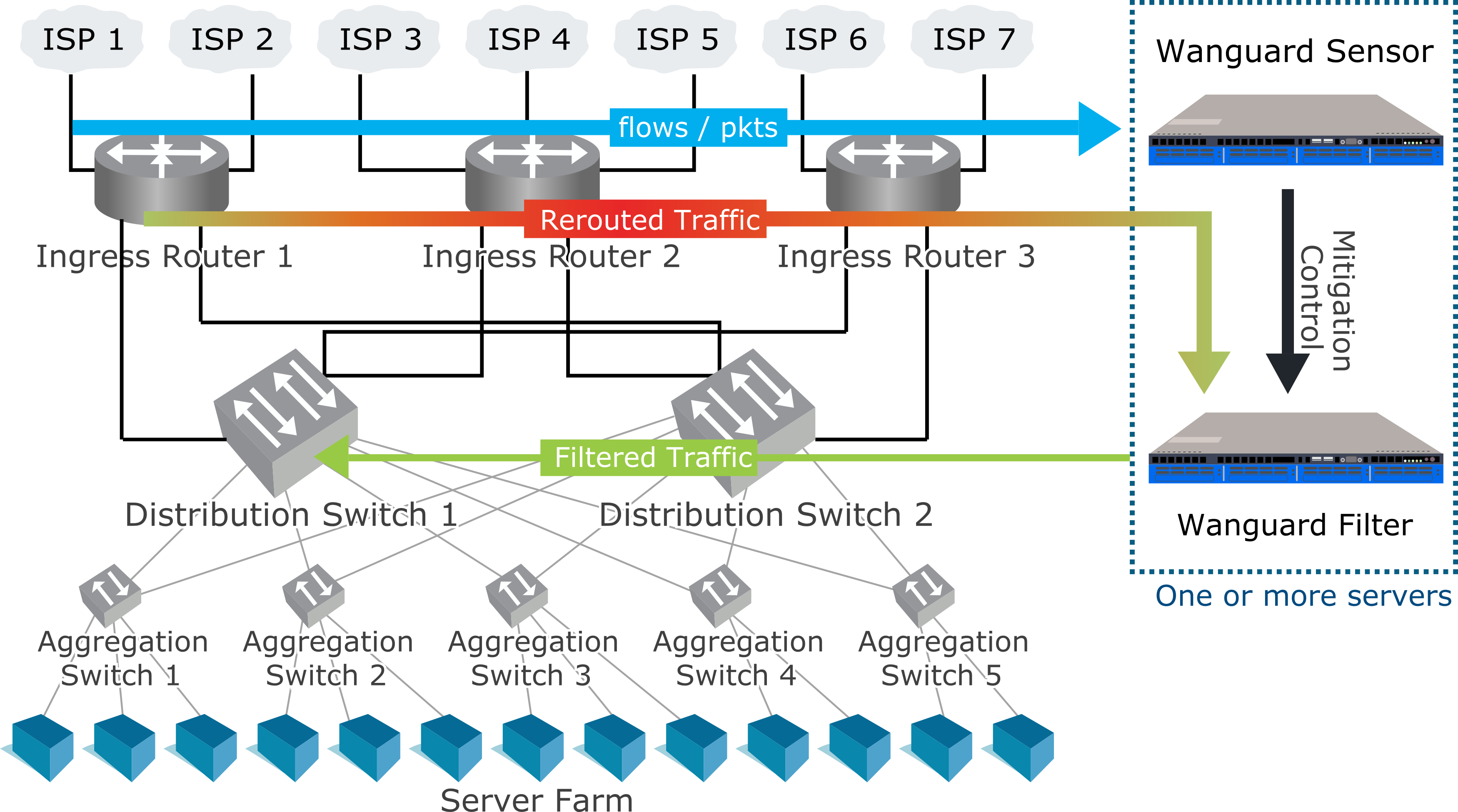
- In-line routing. Wanguard Filter runs on a server that resides in the main data path, configured as a Linux router.
- In-line network bridging. Wanguard Filter runs on a server that resides in the main data path, configured as an OSI Layer 2 Linux network bridge.
- Out-of-line monitoring. Wanguard Filter runs on a server that receives a copy of packets from a network TAP or mirroring port, or flows from a Flow Sensor. Direct filtering is not possible, but it is still able to generate filtering rules that improve the visibility of attacks and can be applied to other in-line appliances or with BGP Flowspec (RFC 5575).
- Critical services. Wanguard Filter runs as a service on each server that provides essential services. It applies the filtering rules to the local firewall.
|
MINIMUM SYSTEM
REQUIREMENTS:
|
|
10 Gbps (~14 Mpps) mitigation |
40 Gbps (~30Mpps) mitigation |
| Topology: |
In-line or out-of-line |
Out-of-line recommended |
| CPU: |
2.4 GHz 10-core Intel Xeon E5-2640v4 |
2.4 GHz 14-core Intel Xeon E5-2690v4 |
| RAM: |
8 GB DDR4 quad-channel |
16 GB DDR4 quad-channel |
| Network Cards: |
1 x 10 GbE card (Chelsio T5+, Intel X520+, other DPDK-supported NIC)
1 x Gigabit Ethernet |
1 x 40 GbE card (Chelsio T5+, Intel XL710+, other DPDK-supported NICs)
1 x Gigabit Ethernet |
| Operating System: |
RHEL/Rocky/Alma 8 to 10; Debian 10 to 13;
Ubuntu 18 to 24 |
RHEL/Rocky/Alma 8 to 10; Debian 10 to 13;
Ubuntu 18 to 24 |
| Disk Space: |
10 GB (including OS) |
10 GB (including OS) |
|
PACKET
FILTERING &
FORWARDING
PERFORMANCE:
|
The traffic-filtering methods directly supported by Wanguard Filter complement each other, performance-wise and feature-wise:
-
The software-based firewalls are very flexible, although not always fast enough on commodity hardware to be able to scrub a full 40 GbE link flooded with small packets. The software filtering performance depends on many parameters such as CPU type/speed/cache, Linux kernel version, NIC chipset, NIC driver, attack type, server load, routed traffic size, the multi-core balance of hardware interrupts, the number of existing rules and multi-queue settings.
-
The in-NIC hardware packet filters can drop 40 or 100 Gbps traffic at wire speed, inside the network adapter's chipset, without loading the CPU. It can apply only a subset of the filtering rules, so it may be not as efficient as the software-based firewall against all types of attacks.
-
Flowspec (RFC 5575) can be used to signal the routers to perform appropriate filtering actions for a particular flow, which is defined by an n-tuple, like a combination of source and destination IP address, protocol number and ports.
The stateless operation of Wanguard Filter ensures the detection and mitigation of volumetric attacks that may cripple even the most powerful stateful devices, such as firewalls, Intrusion Detection Systems (IDS) or Intrusion Protection Systems (IPS). The disadvantage of the stateless operation is that non-volumetric application layer (OSI Layer 7) attacks cannot be blocked, unlike traditional IPSes. Wanguard Filter should be installed on the network's entry points, before other stateful devices.
To increase the packet filtering capacity to 100 Gbit/s or more, you can cluster multiple Packet Filters deployed on different servers with 10+ Gbit/s network adapters. To split the traffic, you can use a hardware load balancer or equal-cost multipath routing.
When a DDoS attack saturates the uplink bandwidth or is above the capacity of the filtering server(s), Sensor can BGP black-hole/null-route the attacked destinations.
|
ADDITIONAL
INFORMATION:
|
You can download and use Wanguard Filter for 30 days by requesting an evaluation license.
You can purchase Wanguard Filter licenses through the online store.
Frequently asked questions are answered in the User Guide and Knowledge Base.
If you need any further information, do not hesitate to contact us. |